
UM GPT
University of Michigan
Redesign UM GPT
Breaking the AI Silo: Redesigning U-M GPT into a collaborative workspace where teams don't just chat—they build together. Enabling shared prompt history, task assignment, and group AI workflows.
Role:
Product Designer
Duration:
Sep 2025 - Dec 2025
Tools
Figma
Figjam
Overview
AI Was Built for Solo Work, But We Work in Teams
UM GPT is the University of Michigan's flagship generative AI platform. It offers powerful, private models to the campus community. But when I investigated how students actually used it, I found a fundamental flaw: The platform was designed for individual work, yet most academic projects happen in groups.
My Strategy: Transform UM GPT from a single-player utility into a multiplayer workspace.
The Impact:
- 92% Task Success Rate.
- 48 Seconds to assign the first task (vs 2+ minutes in external tools).
- SUS Score of 86 (Excellent Usability).
Main Achievement
Top Ranked Project
SI 307: Introduction to User Experience
Keywords
User Research
Visual Design
Figjam
Figma Make
Google Gemini
Wire-framing
Product Design
Usability Testing
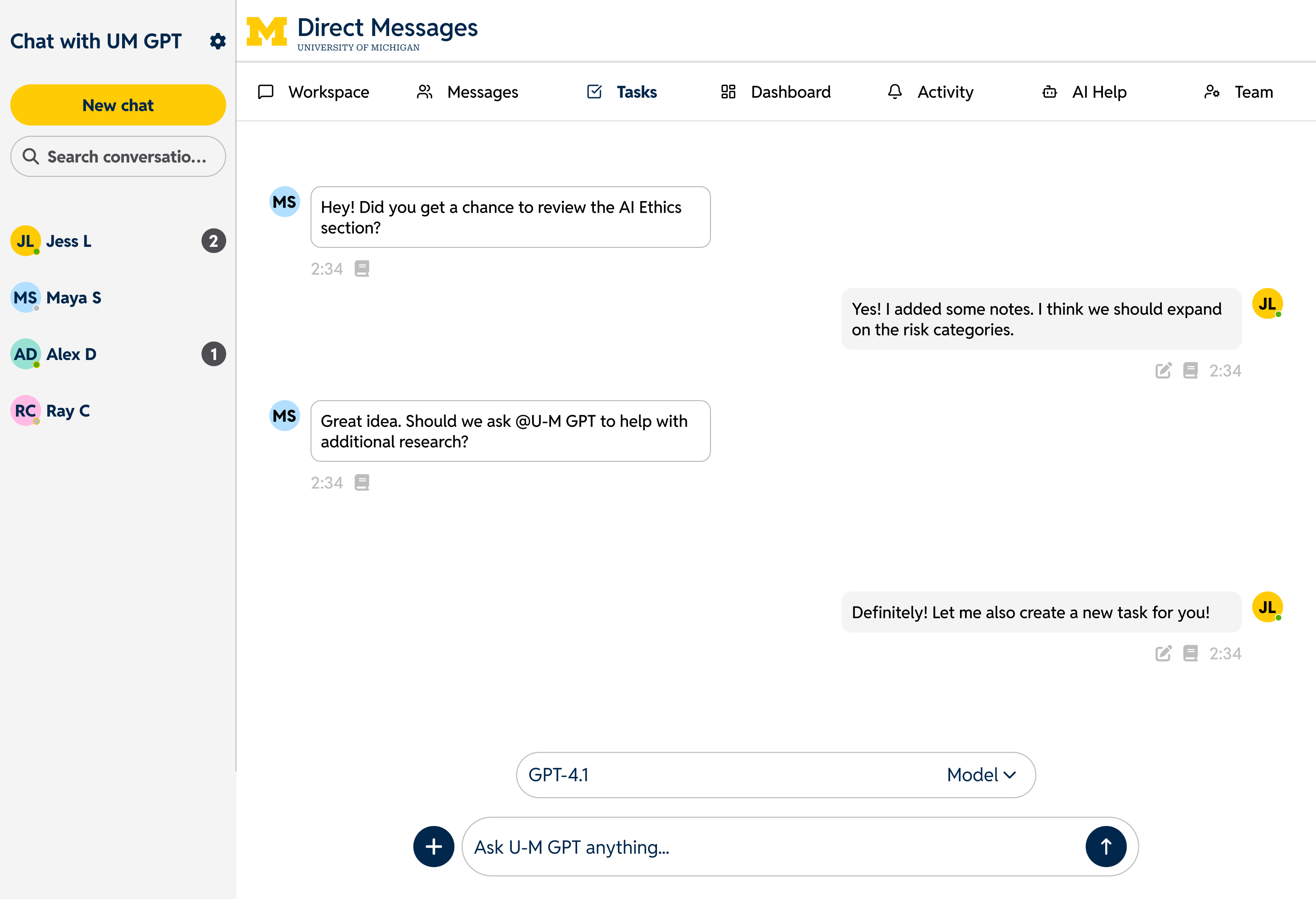
Redesigning UM GPT to support synchronous team workflows.
Problem
The "Frankenstein" Workflow
I interviewed 6 U-M students to understand their habits and watched the same broken pattern repeat:
- Student A prompts ChatGPT privately
- Student A copies the text and pastes it into Google Docs (formatting breaks)
- Student B asks: "Wait, what prompt did you use to get that?"
- No one remembers. Context is lost. They start over.
Teams were stitching together ChatGPT, Docs, Slack, and Notion just to use AI collaboratively. The friction wasn't the AI itself—it was the coordination cost. Students spent more time managing tools than actually working together.
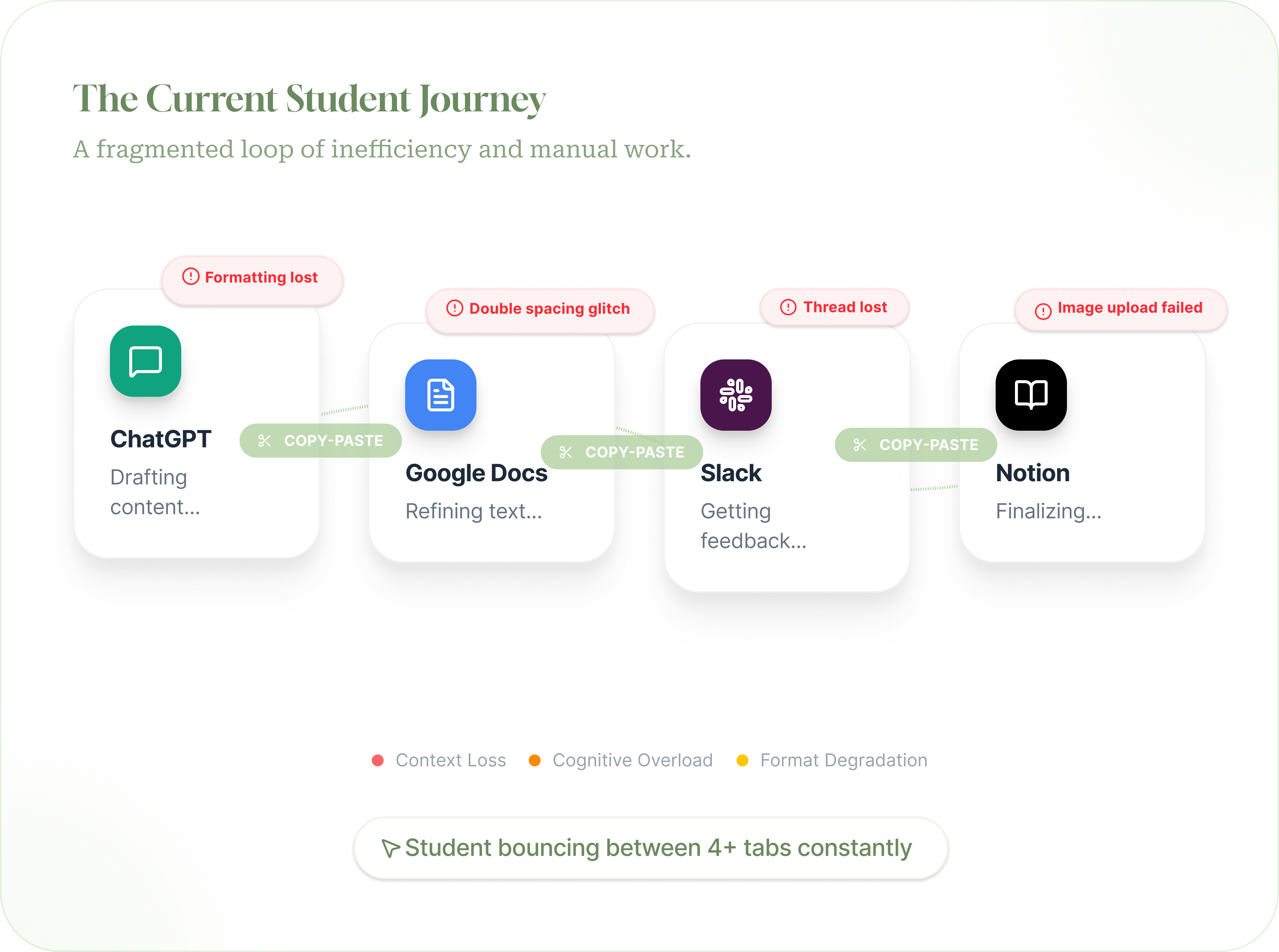
What I noticed across tools:
"We all use AI separately. Then we paste things into Docs and hope it lines up."
"There's no way to tell if someone already asked the AI the same question."
"Some people use AI a lot, others don't, and that imbalance causes tension."
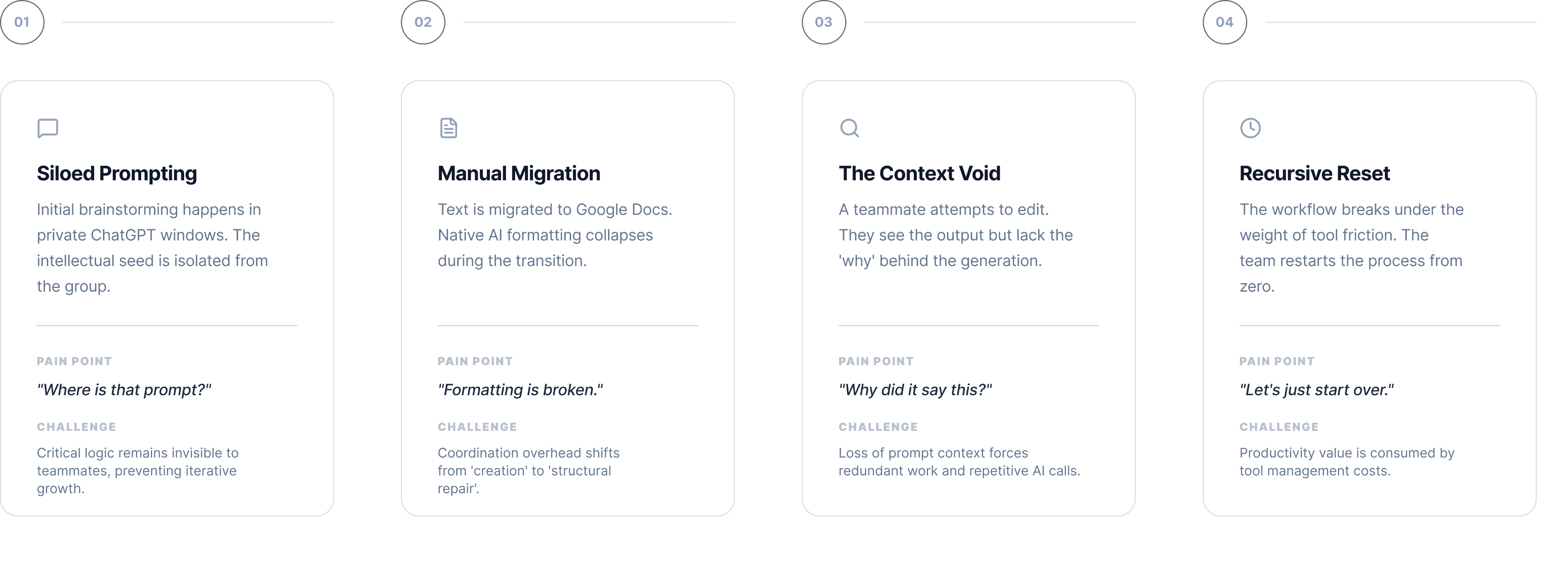
The Current State: Students were losing hours managing tools rather than collaborating.
Solution: Building Collaboration Mode
What if UM GPT worked like a team space?
I designed a Collaboration Mode inside UM GPT that lets teams assign and track tasks, view shared AI prompt history, and use quick AI actions like summarize, brainstorm, and rewrite—all in one workspace. The experience mirrors tools students already know (Slack, Notion) so collaboration feels intuitive instead of experimental.
Challenge 1
AI Output is Passive, But Teamwork is Active
I designed a Collaboration Mode inside UM GPT that lets teams assign and track tasks, view shared AI prompt history, and use quick AI actions like summarize, brainstorm, and rewrite—all in one workspace. The experience mirrors tools students already know (Slack, Notion) so collaboration feels intuitive instead of experimental.
Decision 1: Task Assignment Panel
I added a panel where students can directly assign tasks to teammates within UM GPT.
Why: Students currently rely on outside platforms for coordination, which means constant context switching during AI-assisted work
Impact: Creates a single source of truth for responsibilities and supports accountability by tracking owner, due date, and status


JL
Task Assignments
University of Michigan

Workspace

Messages

Tasks

Dashboard

Activity

AI Help

Team
Total Tasks

3
Completed

1
Overdue

1
Pending

0
Create Assignment with AI
Use @U-M GPT to intelligently create and assign tasks
@U-M GPT Create an assignment for...
Generate
All Tasks
My Tasks
Overdue

AI Systems Risk Categories
Research and document the four main risk categories in the EU AI Act
AI Ethics Group
MS
Maya S

10/19/2025

Literature Review
Compile recent papers on AI ethics and governance
AI Ethics Group
JL
Jessica L
10/17/2025
Presentation Slides
Create initial draft of presentation for final project
General UX
AD
Alex D
10/21/2025
Mark as complete
Assign
Decision 2: Activity Tab
I implemented a visible activity log that tracks all updates—assignments, edits, completions, and AI summaries.
Why: Supports transparency on who did what and when, helps teams track decision-making during long projects
Impact: Enables teammates and instructors to review progress clearly without digging through messages
JL
Activity & Notification
University of Michigan
Workspace
Messages

Tasks
Dashboard

Activity
AI Help
Team
UM GPT Activity Summary
23
Questions answered
7
Resources suggested
4
Summaries created
All Tasks
Mentioned Me

You assigned Literature Review Summary to Maya S
Leave a comment?
5 sec ago

Maya Singh mentioned you in AI Ethics Group
@You could you review the latest draft?
5 min ago

UM GPT suggested resources for EU AI Act Research
Found 5 relevant academic papers and 2 case studies
15 min ago
Decision 3: AI Resources Page
I added AI-powered shortcuts for common tasks like "Generate literature review" or "Create meeting summary."
Why: Students kept repeating routine AI queries, so shortcuts reduce friction and centralize commonly used features
Impact: Groups can quickly tap into UM GPT's capabilities without retyping prompts every time
JL
AI Assistant
University of Michigan
Workspace
Messages
Tasks
Dashboard
Activity

AI Help
Team

What can UM GPT help you with today?
AI-powered assistance for research, collaboration, and productivity
Ask U-M GPT anything... Try 'Create a research summary' or 'Help assign tasks'

Research

Generate literature review on AI ethics frameworks
Find recent papers on EU AI Act implementation
Summarize key findings from research documents

Team Collaboration
Create meeting summary and action items
Generate task assignments from discussion
Suggest optimal task distribution

Content Creation
Draft presentation outline for final project
Create project timeline with milestones
Generate stakeholder email updates

Analysis
Analyze team productivity trends
Compare AI governance frameworks
Identify research knowledge gaps
Quick Actions

Summarize Chat

Create Assignment

Research Help

Draft Email
Landing Page
Why This Needed a Stronger First Impression
While UM GPT offered powerful tools, the existing landing page didn't communicate its significance. As the first GenAI platform offered across an entire university, UM GPT should immediately feel bold, credible, and worth exploring—not just like another AI tool.
What I redesigned:
- Stronger hero moment - Made it clear this is a campus-wide platform with real scale
- Clearer messaging - Emphasized privacy, legitimacy, and responsible AI use upfront
- Role-based entry points - Helped students, faculty, and researchers understand how UM GPT applies to them specifically
The impact:
The page now serves both first-time users (who need to understand value quickly) and returning users (who want immediate access to the platform, articles, and events).
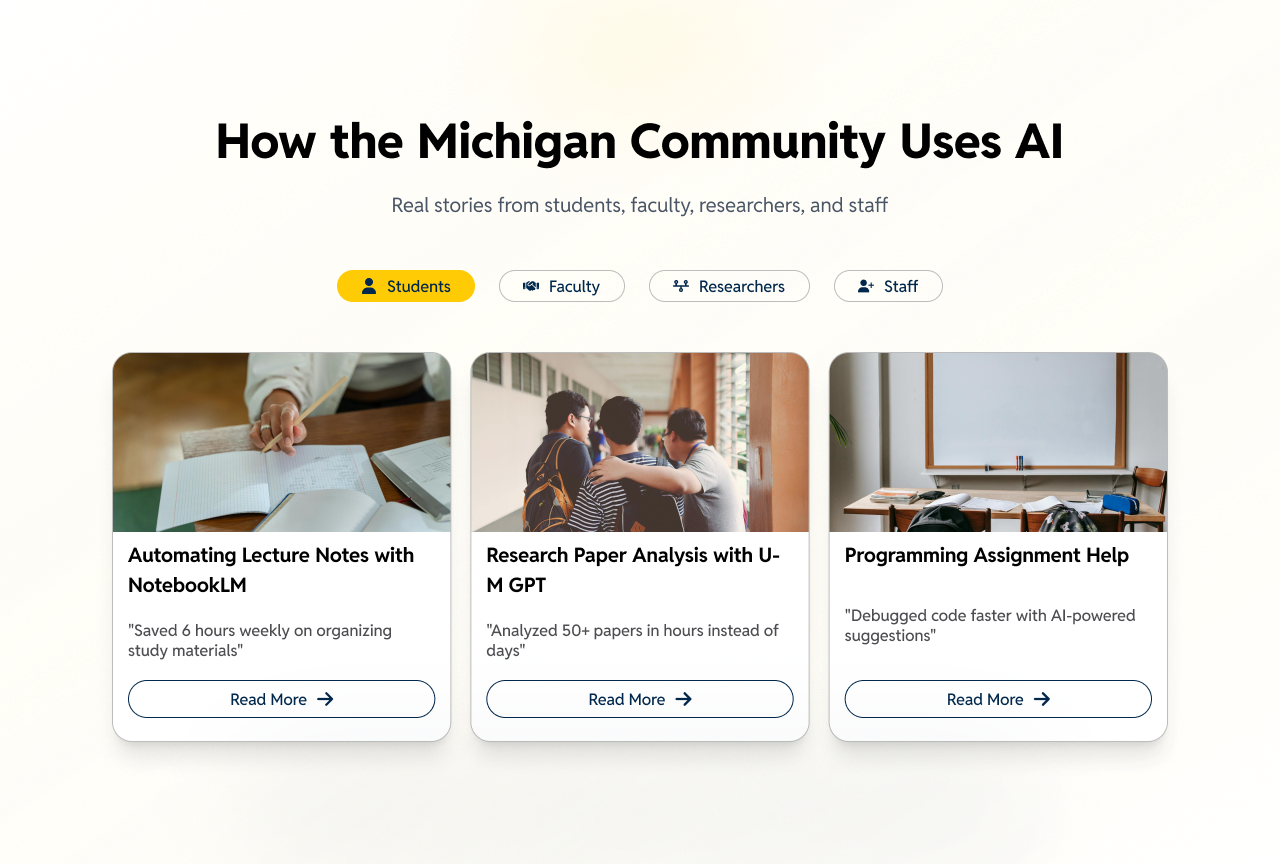
Clear labeling of target audience + real stories of AI implementation
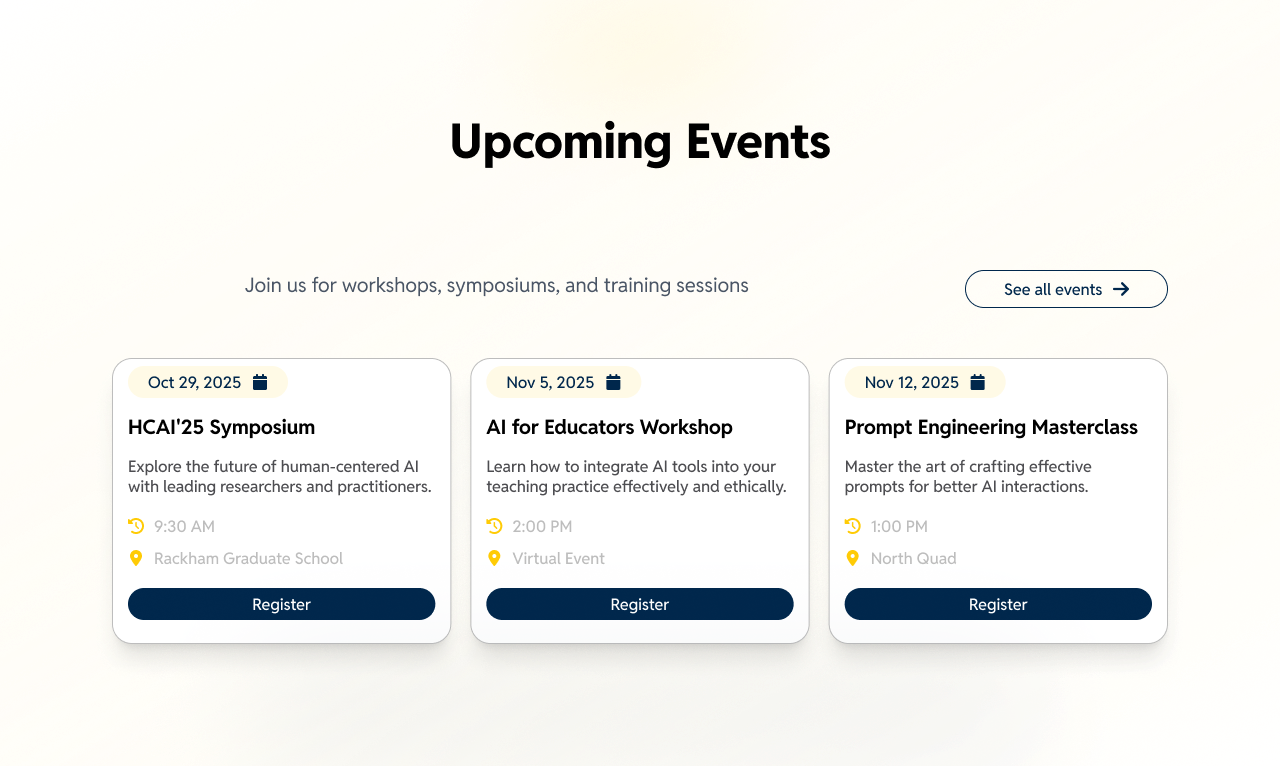
Orchestrated format to best deliver various information all at once
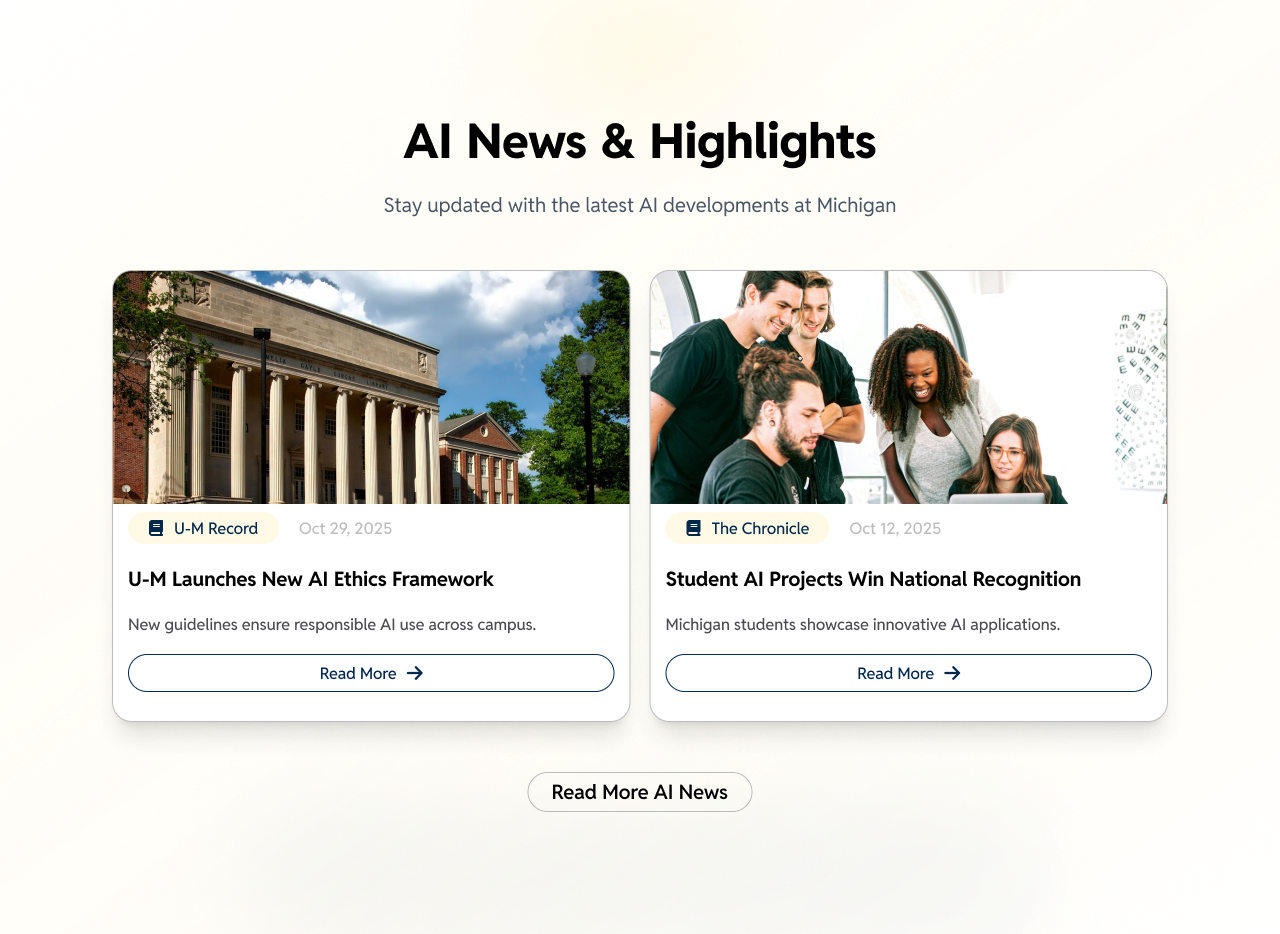
Introduced additional AI news to engage with students
Usability Testing
Does it actually work?
I ran usability testing with 5 U-M students using scenarios like "Create a workspace," "Assign tasks," and "Collaborate with AI."
Results:
92% task success rate
48 seconds on average to assign a first task
SUS score: 86 (excellent usability)
What worked:
Task cards were easy to understand
Shared AI history reduced repeated work
What I improved after testing:
Clearer permission labels
Onboarding tips for first-time collaborators
More obvious entry point for starting collaboration mode
Final Design
Allowing multiple users to collaborate on projects, utilizing UM GPT’s AI capabilities to enhance workflow & efficiency. Alternative font weights help users differentiate priorities.
Conclusion
What I’d Do Differently & Impact
If I kept going with this project, I'd validate the landing page with real usage data and campus stakeholders earlier—especially during peak academic moments like the start of semester or midterms. While the redesign clearly strengthens first impressions, testing with actual first-time users would help fine-tune messaging and content prioritization.
I'd also invest more in content strategy, not just layout. Articles and events could be personalized based on student goals (coursework, research, career prep) to keep the platform relevant beyond initial discovery and drive long-term engagement.
The impact: A clearer sense of leadership and trust. By positioning UM GPT as a flagship GenAI platform and pairing it with accessible collaboration tools, the experience supports more transparent, equitable, and efficient group work, while reinforcing responsible AI use across the university.